Trading & income
No Asteroids Money Making Guide
Read Trade Terminal prices, check Daily Orders, and compare Refining and Buyers in No Asteroids.
Before day 35, prioritize mineral sales and finish Daily Orders that fit your route. Since full-release Update 1.0.2, restoring ship damage offers a separate source of cash, and ordinary rock sells for $2 per unit from day 35 when minerals leave space in cargo.
Read the Trade Terminal
Look at the material, displayed unit price and any change indicator. The day-10 screenshot shows a $12 Star Gold quote with a +22% indicator. Prices can move, and the UI rounds displayed prices, so check the actual sale proceeds before budgeting for an upgrade.
When to sell now or split a large sale
Sell enough to afford the upgrade that will change your next shift if you need the cash today. If the purchase can wait and you have a large stockpile, compare a partial sale now with selling the rest after an overnight price recovery. The November 25 developer notes report faster overnight recovery and smaller price declines from large sales. The recovery percentage and timing beyond that overnight change are unconfirmed.
| Where the money comes from | When to consider it | Known figures |
|---|---|---|
| Daily Order | The requested deposit fits the route you are already planning. | Day-10 demo example: 10 Star Gold for $150. |
| Ship restoration | You are short of cash for a near-term purchase and have damage left to repair. | Full-release 1.0.2: $5 per repaired spot and $100 per finished room, once per campaign. |
| Ordinary rock | It is day 35 or later in the full release and minerals leave spare room. | Full-release 1.0.2: $2 per unit. At that rate 25 units add $50. |
Refining and Buyers
| Terminal upgrade | What the demo showed | What to compare |
|---|---|---|
| Refining | At level 1/20, the next upgrade displayed $270 and the panel showed +6% ore price. | Check how much you sell at your current prices and what the next level actually adds. |
| Buyers | At level 0/10, the upgrade displayed $20,000 and +20% demand. | Compare the demand benefit with what you could spend on air, cargo or tools first. |
Look for income within your shift
- Daily Orders. A day-10 order offered $150 for 10 Star Gold delivered to the lander that shift. Weigh the reward against the air and travel time needed to reach the deposit.
- Museum finds. A Garden Gnome awarded $100 in the demo. Treat that as an occasional bonus when you find one.
- More usable cargo. If you keep returning with spare air and a full hold, compare the next cargo upgrade with the value of a bigger haul.
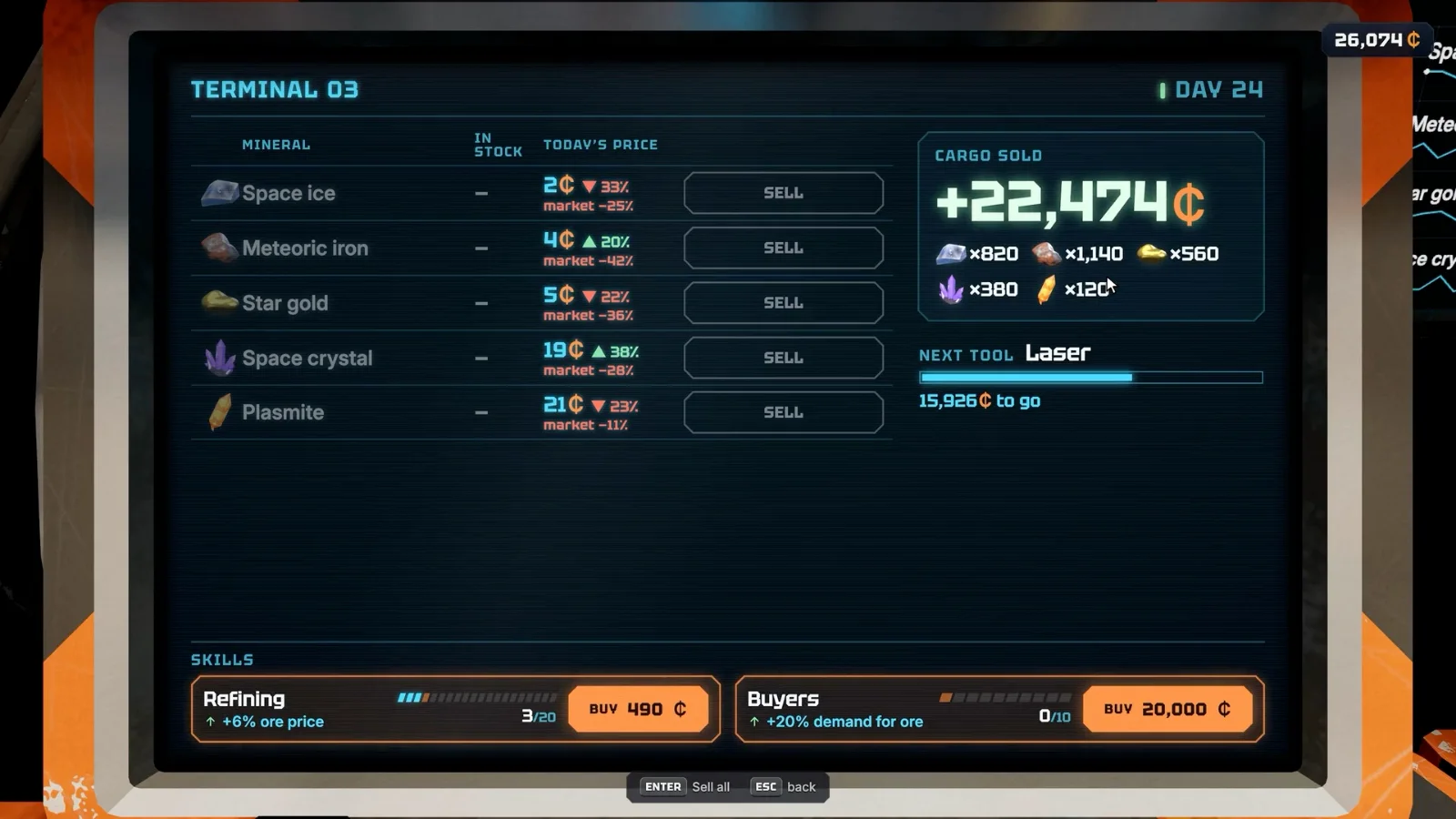
The developer's day-24 Trade Terminal clip shows Refining at level 3 with the next purchase quoted at 490 credits and the same displayed +6% ore-price line. Buyers remains at level 0 on a 20,000-credit quote. Treat these as two snapshots of different levels and builds. The displayed bonus line alone does not establish its stacking rules or your payback time.
Ship weapons and Daily Orders
The launch panel can show bigger orders later in a run. In Grillmastah's recorded campaign at 40:00, the panel offers 1,850 credits to deliver 135 Space Crystal in that shift. This is one recorded offer with no confirmed build number. Read the material, quantity and deadline together before comparing the order against your normal route.
In the November 25 Gear, Progression & Co-op update, ore obtained by ship weapons began counting toward daily delivery objectives. See the ship guns and Tractor Beam guide for the difference between breaking ore and collecting it. If you already have ship weapons, check the order counter after the shift before spending another run on the same mineral. The developer also made refinements to unavailable-mineral orders in Update 1.0.7.
Watch the developer's six-second Trade Terminal clip to see the terminal in use.
See the mineral guide for interpreting ore quotes and the early upgrade guide for other uses of your cash.
When does a faster shift make more money?
With enough ore in storage, compare the shift’s sale proceeds after accounting for what you sold from earlier cargo. If Engineering volume rises and the Trade Terminal still has little new inventory, recovery or hold capacity is the bottleneck. Update 1.0.8 extends the Compactor to the ship hold. On older builds, use the lander and ship storage displays separately when checking whether that upgrade will improve saleable volume. See the automated mining guide for the contribution and cargo checks.
Sources
- Update 1.0.2 developer notes (full release, November 25, 2026).
- Developer announcement archive (November 25 Gear, Progression & Co-op update and November 26 Update 1.0.7).